ZeroMQ
Attention
This feature is only available in ScanImage® Premium 2025.0.0 and later.
For certain scanner configurations, ScanImage® is capable of publishing frame information using the ZeroMQ (ØMQ, 0MQ, or ZMQ) protocol.
Protocol Overview
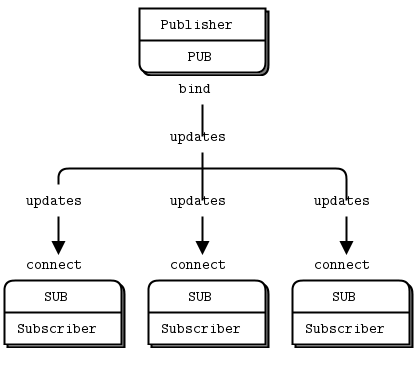
pub-sub overview from the ZeroMQ guide
ScanImage® uses the basic pub-sub pattern to publish frames as they are received from the data pipeline. No other patterns are currently supported.
The ScanImage® software will start listening through its own publishing server when any acquisition is started.
Note
Windows’s firewall may request administrator approval when any acquisition with ZeroMQ enabled is started. Access must be allowed for other clients to connect to the ZeroMQ server through the network.
Tip
ZeroMQ will emit frame data from channels that are logged in ScanImage®, even if logging itself is disabled.
ScanImage® Configuration
ZeroMQ needs an address before a ZeroMQ server can be started. This can be configured in two ways:
Using the provided
ZMQ Configurationdevice for basic users.Directly modifying the
ZMQAddressproperty within the ScanImage®RGGScanobject.
Attention
ZeroMQ support is currently limited to the Resonant scanning modes of vDAQ scanning systems. Support for other scan modes and scan systems are planned for a future release.
Via Configuration Device
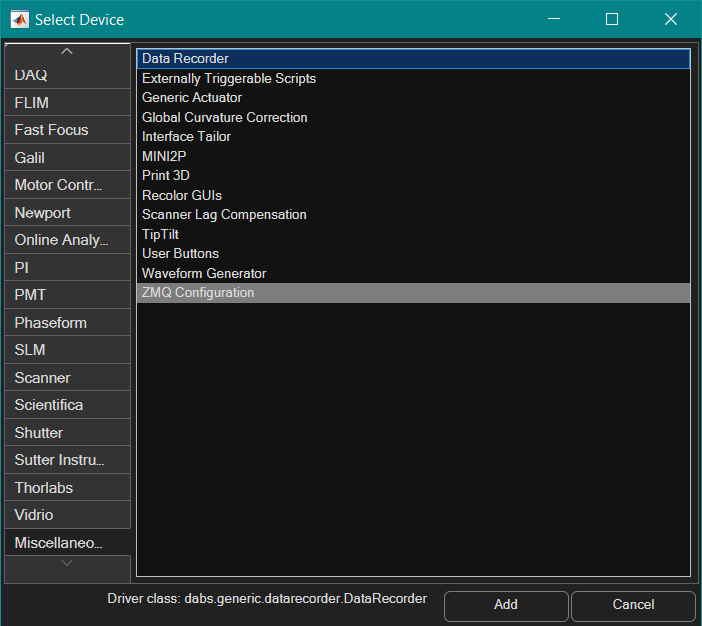
The ZMQ Configuration device under the Select Device page.
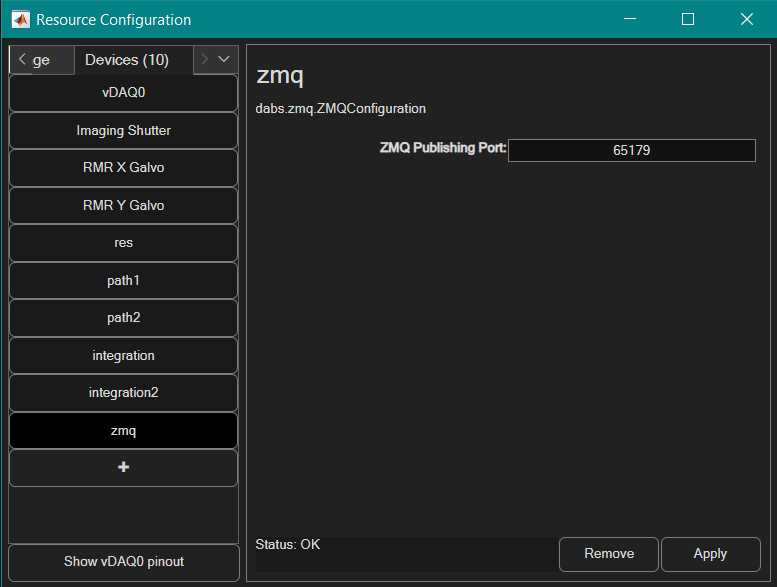
The network port that the ZeroMQ server will listen through.
Note
The ZMQ Configuration device only configures the network port, and is configured to listen to all connecting addresses. If the user wishes to only allow certain addresses to connect to ZeroMQ, they must do so through the command window.
Via Command Window
For users who are comfortable using the command window to interface with ScanImage®, the ZeroMQ address can be directly modified with the following snippet:
hSI.hScan2D.hAcq.ZMQAddress = 'tcp://*:65179';
Tip
If the above code does not work, check your scanner configuration under the Scanner Configuration Panel. ZeroMQ is only supported on vDAQ scan systems and only in the “resonant” scan mode. The ZMQAddress property only exists if the currently selected scanner is RGGScan.
Tip
Setting ZMQAddress to an empty string will disable the ZeroMQ listening server.
The endpoint address provided to the ZMQAddress property is the same used for connections and bindings in the ZeroMQ API. The documentation for available transports can be found under the zmq_bind documentation page.
Client Information
Attention
ScanImage® does not provide a default subscriber implementation. It is up to the user to have a method to subscribe to the configured ZeroMQ port and properly receive the multipart messages that are published. ZeroMQ provides a variety of language bindings along with their low-level C library on their documentation page. These language bindings can be used to subscribe to the publishing server created by ScanImage®.
Message Format
ScanImage® publishes frames along with metadata as a multipart message. The order of the message parts is as follows:
A 40-byte packet of structured data with the following ordered fields and types:
(double)
pixelsPerLine: The x resolution of the image(double)
linesPerFrame: The y resolution of the image(double)
numChannels: The number of channels of the image.(double)
timestamp: The elapsed time between the start of acquisition and this frame in seconds.(double)
frameNumber: The frame number of the provided frame for the entire acquisition.
The raw image data as a buffer of 2-byte signed integers (
int16) with the dimension ordering of(x,y,channel). The size of the frame data will depend on the metadata passed in the first part of the message.
Example
The following python script is provided as a basic example to receive and process the first 10 frames as published by a local instance of ScanImage®.
The script requires numpy and Pyzmq (docs).
 1import zmq
 2import struct
 3
 4context = zmq.Context()
 5socket = context.socket(zmq.SUB)
 6socket.connect("tcp://127.0.0.1:65179")
 7
 8# Subscribe to all topics
 9socket.setsockopt_string(zmq.SUBSCRIBE, "")
10
11print('Listening for published messages...')
12
13metadata = None
14current_frame_number = 0
15frames = []
16while True:
17    header = socket.recv()
18    # Unpack 5 doubles: 'd' = double (8 bytes), so '5d' = 5 doubles
19    pixels_per_line, lines_per_frame, num_channels, timestamp, current_frame_number = struct.unpack('5d', header)
20
21    frame = socket.recv()
22    average_pixel = np.mean(np.frombuffer(frame, dtype=np.int16))
23    print(f'[{current_frame_number}] average pixel value: {average_pixel}')
24
25    if current_frame_number > 10:
26        print("done")
27        break # or do keyboard interrupt once done