Edit Stim Groups Tab
Note
This feature is a sub-tab of the Photostim Tab
Stim Scanfields Panel
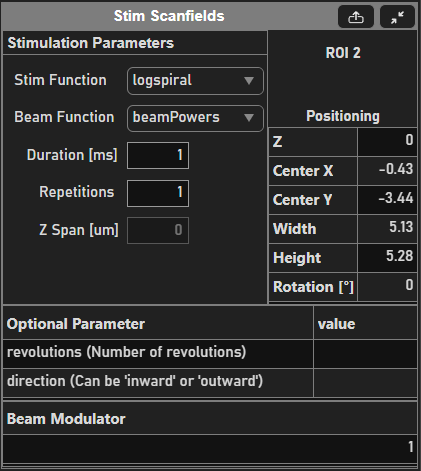
Stimulation Parameters
Field |
Description |
Stim Function |
The stimulation function used when adding ROIs through the Stim ROIs Panel. See Built-in Stimulus Functions for built-in functions. See Custom Stimulus Functions for information on how to add your own functions to this dropdown menu. |
Beam Function |
The beam power function used for precise beam power control over time. Similarly to Custom Stimulus Functions custom beam power functions can be provided by the user through additional functions in the <home>\+scanimage\+mroi\+stimulusbeamfunctions directory. |
Duration [ms] |
How long to stimulate the selected pattern. Default is 1 ms. |
Repetitions |
How many times to repeat the selected pattern. |
ROI Positioning
Field |
Description |
Z |
Depth of the stimulus pattern. |
Center X|Y |
XY position of the center point of the stimulus pattern in optical degrees. |
Width|Height |
Size of the stimulus pattern in optical degrees. |
Rotation [°] |
Angle of rotation of the scanfield. |
Optional Parameter
This table is populated with fields specific to the selected stimulus pattern. For information regarding optional parameters per stimulus pattern, see Built-in Stimulus Functions.
Beam Modulator
For certain photostimulation patterns, this field is an array indicating power per beam in %.
Stim ROIs Panel
Button |
Description |
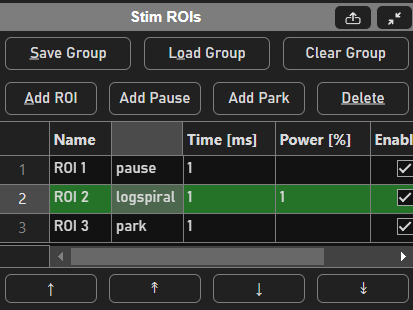
Save|Load Group |
Saves or loads all currently created stimulus patterns to/from a .roi file. |
Clear Group |
Clears all currently created stimulus group from the table. |
Add ROI |
Adds a stimulus pattern. This button begins a drawing tool in the viewport. |
Table Column |
Description |
Name |
The user-provided name of the pattern. |
(Type) |
The type of photostimulation pattern (pause, park, logspiral, etc.). For more information regarding the types of photostimulation patterns, refer to Built-in Stimulus Functions. |
Time [ms] |
How long to stimulate the selected pattern. Tied to the Duration field in Stim Scanfields Panel. |
Power [%] |
Tied to the Beam Modulator field. Sets the beam power in % per stimulus pattern. |
Enable |
Toggles whether or not the pattern is scanned. |
Display |
Toggles whether or not the pattern is displayed. |
Note
The green highlighted row indicates which scanfield is currently selected. This will also populate the Stim Scanfields Panel.
Movement Buttons |
Description |
↑↓ |
Move previously selected/moved scanfield up or down by one row. |
↟↡ |
Move previously selected/moved scanfield to the top or bottom of the entire table. |